I have seen a lot of businesses make the same mistake with email. They build a list, then send the exact same message to everyone on it, whether that person signed up yesterday or bought from them three years ago. That is not an email marketing lifecycle. That is just shouting into a crowd and hoping someone listens.
Here is the simple truth: An email marketing lifecycle is just the journey a person goes through with your brand, from the day they give you their email address to the day they become a loyal customer who tells their friends about you. Once you understand this journey, your emails stop feeling like spam and start feeling like a real conversation.
In this guide, I will walk you through the 6 stages of the email marketing lifecycle in plain, simple terms. I will show you real lifecycle email examples you can use right away, and I will explain how a simple tool like BIGContacts helps you do all of this without needing a marketing degree or a huge budget.
What Is the Email Marketing Lifecycle?
The email marketing lifecycle is the series of stages a contact passes through as their relationship with your business grows, matched with the type of email they should receive at each stage. Instead of one email for everyone, each lifecycle email is triggered by where the contact actually stands, not by the calendar.
Think of it less like a newsletter schedule and more like a relationship map. A brand-new subscriber needs an introduction. A customer who bought last month needs help getting value from what they bought. A customer who has gone quiet for six months needs a nudge, not a sales pitch. This is really just one piece of the bigger picture of customer lifecycle management, narrowed down to the email channel specifically.
A study by Statista in 2024 shows email marketing revenue worldwide was projected to surpass 9.5 billion U.S. dollars that year, with few other channels matching its return on investment. That return does not come from sending more emails. It comes from sending the right lifecycle email to the right person at the right stage.
Why Does Email Marketing Lifecycle Matter for Your Business?
Lifecycle email marketing matters because it replaces guesswork with relevance, so every message a contact receives actually fits where they are in their journey with you. That relevance is what turns opens and clicks into real revenue instead of unsubscribes.
Here is what changes when you stop sending one-size-fits-all emails and start using lifecycle emails instead:
- Fewer unsubscribes. People leave a list when every email feels irrelevant. A welcome email to a new subscriber and a win-back email to a lapsed customer solve two completely different problems.
- Higher open rates over time. A contact who has learned that your emails are timely and useful keeps opening them.
- More repeat purchases. Retention-stage emails remind existing customers why they chose you, instead of leaving that relationship to chance.
- Better use of a small list. You do not need 50,000 contacts to see results. You need the right message at the right stage, even with 500 contacts.
A study by McKinsey in 2021 shows companies that excel at personalization generate 40 percent more revenue from those activities than companies that do not. That is the entire case for lifecycle email marketing in one statistic. Same list size, more revenue, just because the message finally matches the moment.
This is also where BIGContacts by ProProfs fits in. BIGContacts is a simple, affordable CRM built for growing small businesses, with contact management, email marketing, task automation, and sales pipeline tracking all in one place, so you can actually see which stage each contact is in before you hit send.
What Are the Key Stages of the Email Marketing Lifecycle?
The email marketing lifecycle has 6 core stages, and each one calls for a different type of lifecycle email built around what the contact needs to do next, not what you want to sell them. Here is the short version before we break down each stage in detail:
- Awareness: A person discovers your brand for the first time.
- Welcome: The contact confirms their email or signs up.
- Engagement: The contact is warming up and reading your content.
- Conversion: The contact is ready to buy or start a trial.
- Retention: The contact has become a customer.
- Re-engagement: The contact has gone quiet and needs a nudge back.
Now let’s look at what actually happens, and what to send, at each one.
What Happens During the Awareness Stage?
A person discovers your brand for the first time, usually through a blog post, an ad, a referral, or a lead magnet like a checklist or template. Your only job at this stage is to earn the email address and set the right expectation for what they will receive next.
- Trigger: Downloading a resource, subscribing to a blog, or filling out a web form.
- Goal: Convert a stranger into a known contact, without asking for anything else yet.
- Example lifecycle email: A short thank-you email that delivers the promised lead magnet immediately, with one line about what future emails will cover.
- Common mistake: Asking for a demo or a sale in this very first email. Nobody has decided to trust you yet.
What Should a Welcome Email Include?
The welcome stage begins the moment someone confirms their email or completes sign-up. This is the highest-attention moment you will ever get from a contact, so the welcome lifecycle email should introduce your brand, set expectations, and offer one clear next step, not five.
- Trigger: Email confirmation or account creation.
- Goal: Build a first impression and point to a single, useful next action.
- Example lifecycle email: “Welcome, here’s what to expect from us” with one link to a getting-started guide or a short product overview.
- Common mistake: Cramming your entire product catalog or every feature into one welcome email. One clear next step converts better than ten options.
How Do You Nurture Contacts During the Engagement Stage?
The engagement stage is where the contact is warming up. They are reading your content, clicking links, maybe attending a webinar, but they are not ready to buy yet. This is the natural home for lead nurturing, where useful, non-salesy content builds enough trust to move someone forward.
- Trigger: Repeated opens, clicks, or content downloads.
- Goal: Build trust and educate, without pushing for a sale too early.
- Example lifecycle email: A short case study or how-to email sent a few days after the welcome email, showing a real outcome rather than a feature list.
- Common mistake: Sending purely promotional content at this stage. Engagement-stage contacts respond to help, not offers.
What Moves a Contact Into the Conversion Stage?
The conversion stage is where the contact is ready to buy or sign up for a trial, often after a specific trigger like visiting a pricing page or requesting a demo. Emails here need to remove friction, not add more information the contact already has.
- Trigger: Pricing page visit, demo request, or cart activity.
- Goal: Give the final nudge needed to say yes.
- Example lifecycle email: A direct comparison email, such as “Here’s what changes when you switch from spreadsheets to a CRM,” paired with a simple trial or demo link.
- Common mistake: Adding new information instead of removing doubts. At this stage, simplicity beats detail.
How Do You Keep Customers in the Retention Stage?
Retention begins the moment the contact becomes a paying customer. Onboarding tips, feature education, and check-in emails help them get real value from what they bought, which is what keeps them from churning quietly a few months later.
- Trigger: Purchase confirmation or account upgrade.
- Goal: Help the customer succeed with what they already bought.
- Example lifecycle email: A 30-day check-in asking if the customer needs help with a specific feature, with a link to a short guide.
- Common mistake: Going quiet after the sale. Most churn starts with silence, not dissatisfaction.
How Do You Win Back Contacts in the Re-Engagement Stage?
Re-engagement applies to any contact who has gone quiet, whether that is an inactive subscriber or a lapsed customer. A win-back lifecycle email, often tied to a specific trigger like a renewal date or an anniversary, gives them a real reason to come back instead of a vague nudge.
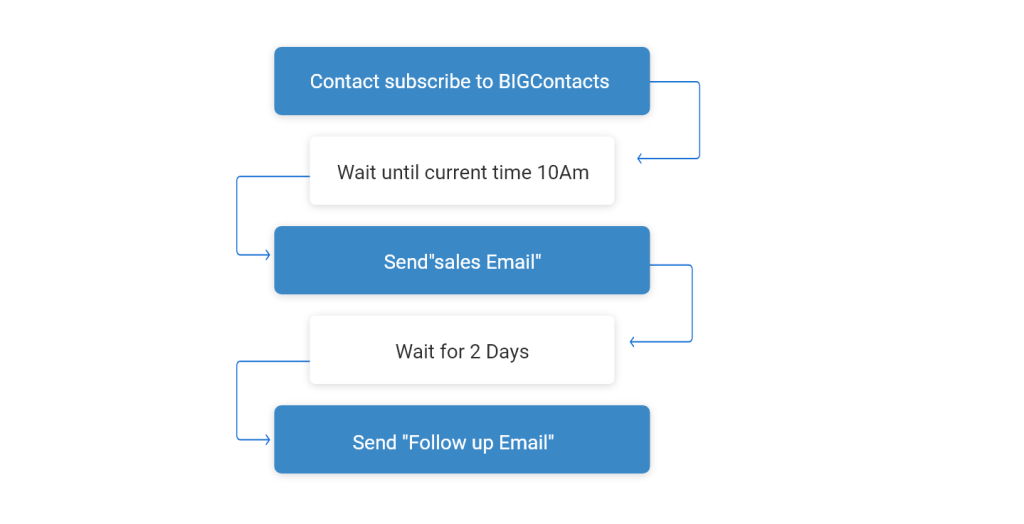
- Trigger: A set period of inactivity, often 60 to 90 days, or an upcoming renewal date.
- Goal: Re-open the relationship with something relevant, not a generic “we miss you.”
- Example lifecycle email: A follow-up email tied to a subscription renewal or product anniversary, offering a specific reason to re-engage.
- Common mistake: Sending the same generic win-back message to every lapsed contact, regardless of why they went quiet in the first place.
Notice that none of these lifecycle emails are random. Each one answers a question the contact is silently asking at that exact moment, which is why lifecycle email marketing consistently beats one-off campaigns.
What Are Some Lifecycle Email Marketing Examples You Can Use?
Real lifecycle email examples are easier to copy than abstract advice, so here are practical, ready-to-adapt lifecycle email marketing examples for each stage, including what to put in the subject line and why the approach works.
Awareness Stage Examples
- “Here’s your [resource name], as promised”: delivers the lead magnet instantly and sets expectations for future emails. Works because it keeps the promise made on the sign-up form without delay.
- “3 things you’ll get from us”: a short orientation email explaining what kind of content the subscriber signed up for. Works because it reduces the chance of an early unsubscribe from mismatched expectations.
Welcome Stage Examples
- “Welcome! Here’s where to start”: one clear next step, such as a getting-started guide. Works because it avoids overwhelming a brand-new contact with every feature at once.
- “Quick question before we get started”: a short email asking about the contact’s specific goal, used to tag and segment them for future lifecycle emails. Works because it turns the welcome email into useful segmentation data.
Engagement Stage Examples
- “How [a similar business] solved [specific problem]”: a short case study format. Works because it shows proof instead of asking the reader to take your word for it.
- “3-minute read: [useful tip related to their interest]”: a short educational email with zero sales pitch. Works because it keeps building trust before asking for anything.
Conversion Stage Examples
- “Here’s what changes when you switch to Email Marketing”: a direct before-and-after comparison. Works because it removes the mental effort of imagining the outcome themselves.
- “Still deciding? Here’s a 2-minute demo”: a low-friction offer for contacts who have shown buying signals but haven’t converted. Works because it lowers the commitment needed to take the next step.
Retention Stage Examples
- “You’re 30 days in, here’s a tip most people miss”: a helpful onboarding nudge. Works because it proactively prevents the confusion that often leads to early churn.
- “A feature you might not have tried yet”: introduces an underused feature relevant to how the customer already uses the product. Works because it increases the reasons a customer has to stay.
Re-Engagement Stage Examples
- “Your renewal is coming up, here’s what’s new”: ties the win-back message to a real, relevant date. Works because it gives the contact a concrete reason to open, not just a guilt trip.
- “It’s been a while, here’s what you missed”: a short summary of new features or content since the contact went quiet. Works because it respects their time instead of assuming they remember everything about your product.
What Features Should You Look for in a Lifecycle Email Tool?
A good lifecycle email tool needs to combine contact data with automated sending, so the software can trigger the right email based on real contact behavior instead of you manually tracking who gets what. Here is what to look for, broken down by capability.
Does It Centralize Contact Data?
The tool should store every contact’s stage, tags, and custom fields in one record, not scattered across a spreadsheet and a separate email platform. Without this, you cannot reliably tell which lifecycle stage a contact belongs to when it is time to send.
Can It Automate Lifecycle Emails Based on Behavior?
Look for triggers based on sign-up date, purchase, or link clicks, so a welcome email fires automatically the moment someone subscribes, without you remembering to send it manually. This is what actually makes a lifecycle scale past a handful of contacts.
Does It Segment Contacts by Stage?
The tool should let you group contacts into lists by stage, industry, or behavior, so a re-engagement email only goes to genuinely inactive contacts instead of your entire list. Better customer segmentation is what separates a relevant lifecycle email from a mass blast.
Can You Track Opens, Clicks, and Unsubscribes?
Reporting on open rates, click-through rates, and unsubscribe rates per campaign tells you whether a specific stage’s emails are actually working, or whether a stage needs a rewrite. Without this, you are guessing at performance instead of measuring it.
Does It Log Email History Automatically?
Every email sent and received should log against the contact’s history automatically, so anyone on your team can see the full conversation without digging through separate inboxes. This matters most once more than one person touches the same contacts.
Does It Connect Email Activity to the Sales Pipeline?
The strongest lifecycle tools connect email activity to the sales pipeline stage automatically, so a click on a pricing link can shift a contact from “engaged” to “conversion ready” without manual updates.
Are Email Templates Included?
Pre-built email templates mean campaigns do not start from a blank page every time, which matters most for small teams without a dedicated designer or copywriter on staff.
BIGContacts by ProProfs is a simple, affordable CRM built for growing businesses, with contact management, email marketing, task automation, and sales pipeline tracking all in one place, which is exactly the combination a lifecycle email strategy needs to run on autopilot. It also offers a forever-free plan for up to 100 contacts, so you can map out your first lifecycle sequence before spending a single dollar.
What Problems Does Email Marketing Lifecycle Solve?
Lifecycle email marketing solves the specific, recurring problems that come from treating every contact the same way, no matter how long they have known your brand or what they have already done.
- Problem: New leads go cold. Solution: A welcome sequence engages them within minutes of sign-up, while interest is highest.
- Problem: Contacts feel spammed. Solution: Segmented, stage-based emails mean people only get messages relevant to where they actually are.
- Problem: Customers churn quietly. Solution: Retention-stage emails catch drop-off signals early, before the customer cancels or stops buying.
- Problem: Past customers are forgotten. Solution: Automated re-engagement emails, tied to renewal or anniversary dates, bring lapsed contacts back without manual follow-up.
- Problem: Marketing and sales data live in separate tools. Solution: A CRM-based email tool keeps contact history, email activity, and pipeline stage in one record, so nothing gets lost between spreadsheets, inboxes, and sticky notes.
How Does Lifecycle Email Marketing Compare to One-Off Campaigns?
Lifecycle email marketing and one-off mass email campaigns solve different problems, and most businesses actually need both, just not in equal amounts.
| One-Off Campaigns | Lifecycle Email Marketing | |
| Trigger | A calendar date (e.g., “send Friday”) | A contact action (sign-up, purchase, click) |
| Audience | Entire list or broad segment | Specific stage or behavior segment |
| Goal | Announce a sale, event, or update | Move the contact to the next stage |
| Setup effort | Low, built each time | Higher upfront, then automated |
| Long-term result | Short-term spike in opens | Steady, compounding retention and revenue |
A one-off campaign is the right tool for a flash sale or a product launch announcement. Lifecycle email marketing is the right tool for everything that happens between those announcements, which is most of the calendar year.
How Can You Track Contacts Through the Email Lifecycle?
You track contacts through the email lifecycle by recording each interaction, sign-up, click, purchase, or reply, against a single contact record, so the system always knows which stage someone belongs to without you checking manually.
Here is how that works in practice, step by step:
- Capture the contact. A webform, landing page, or manual entry adds the person to your database with their source noted. This is where lead capturing starts, and it needs to happen automatically, not through a spreadsheet someone updates once a week.
- Tag the stage. The contact is tagged as “new lead,” “engaged,” “customer,” or “lapsed” based on their activity so far, so anyone on the team can see their status at a glance.
- Trigger the right lifecycle email. Automation rules send the matching email the moment a contact enters a new stage, rather than waiting for someone to notice and send it manually.
- Log the response. Opens, clicks, and replies are recorded against the contact record automatically, building a real history instead of relying on someone’s memory of “did we already email them about this?”
- Move the contact forward or back. A click on a pricing page might move someone from “engaged” to “conversion ready.” Six months of silence might move a customer to “re-engagement.” This movement should happen based on rules, not a manual review.
- Report on the whole pipeline. Reports show how many contacts sit in each stage, so you can see exactly where people are getting stuck, whether that is a weak welcome sequence or a retention gap right after purchase.
Here is a small, concrete example of why this matters. Say a contact clicks a link inside a webinar invitation email. On a spreadsheet, that click goes unnoticed unless someone happens to check. In a CRM, that same click can automatically move the contact from “engaged” to “conversion ready” and trigger a follow-up email within the hour, while their interest is still fresh.
This is the exact gap a spreadsheet cannot close. Excel can store an email address, but it cannot tell you that a specific contact clicked a webinar link four days ago and should move to a different lifecycle stage. A CRM like BIGContacts logs that click and adjusts the contact’s stage automatically, which is the difference between a list and an actual lifecycle.
How Do You Choose the Right Lifecycle Email Marketing Tool?
Choosing the right lifecycle email marketing tool comes down to matching the tool’s complexity to your team’s size and current contact management setup, not picking whatever has the most features on paper.
Ask yourself these questions before you commit to a tool:
- Does it combine contacts and email in one place, or will you still be exporting lists between two systems?
- Can a non-technical team member set up an automated sequence without a developer or a lengthy onboarding call?
- Does it show you which stage each contact is in at a glance, not buried in a report you have to build yourself?
- Does pricing scale with your contact list, so you are not paying enterprise prices for a small business list?
- Is there a free plan to test the workflow before you pay anything?
For small and mid-sized teams moving off spreadsheets or an inbox-based system, BIGContacts by ProProfs is a simple, affordable CRM built for growing small businesses, with contact management, email marketing, task automation, and sales pipeline tracking all in one place.
Its marketing automation module lets you set drip sequences by lifecycle stage, its email tracking shows opens and clicks per contact, and its core CRM features keep every stage tagged against one contact record instead of three different tools.
Start Sending Emails People Actually Want to Open
The email marketing lifecycle is not a complicated framework. It is really just a reminder that a brand-new subscriber, an engaged prospect, a paying customer, and a lapsed customer are four different people with four different needs, even if they are all sitting in the same spreadsheet row right now.
Once you map your contacts to these 6 stages, awareness, welcome, engagement, conversion, retention, and re-engagement, the actual emails get much easier to write. You are no longer guessing what to say. You are just answering the question the contact is already asking at that stage.
If you are managing this across spreadsheets, a separate email tool, and a separate CRM right now, that gap is usually where lifecycle stages get missed. For teams looking for something simple to start with, a tool like BIGContacts makes it easy to see every contact’s stage and automate the right lifecycle email without hours of training or a big budget.
Frequently Asked Questions
How many stages does the email marketing lifecycle have?
Most frameworks use 6 stages: awareness, welcome, engagement, conversion, retention, and re-engagement. Some brands combine or split these further based on their sales cycle.
Is lifecycle email marketing only for ecommerce?
No. Lifecycle email marketing works for any business with a customer journey, including B2B services, agencies, non-profits, and local businesses, since every contact still moves through awareness, engagement, and retention.
How is lifecycle email marketing different from drip campaigns?
A drip campaign is a set of pre-scheduled emails sent in sequence after a trigger. Lifecycle email marketing is the broader strategy, and drip campaigns are one tool used inside it to automate specific stages.
What triggers move a contact to the next lifecycle stage?
Common triggers include signing up, clicking a specific link, making a purchase, replying to an email, attending a webinar, or going a set number of days without opening an email.
How often should you send lifecycle emails?
Frequency depends on the stage, not a fixed schedule. Welcome emails go out within minutes of sign-up, engagement emails every few days, and re-engagement emails after a defined period of inactivity, often 60 to 90 days.
Can a small business run lifecycle email marketing without a big team?
Yes. A CRM with built-in email automation, like BIGContacts, lets a single marketer or founder set up lifecycle sequences once and let the system trigger emails automatically as contacts move through stages.
What is the difference between a lead and a lifecycle stage?
A lead is a type of contact. A lifecycle stage describes where that contact currently stands in their relationship with your brand, so the same lead can move through several stages over time.
Do you need a CRM to do lifecycle email marketing?
You do not strictly need one, but tracking stages manually in a spreadsheet gets unreliable past a few hundred contacts. A CRM keeps contact data, stage tags, and email activity in one record automatically.
What metrics show a lifecycle email strategy is working?
Watch stage-to-stage conversion rate, unsubscribe rate by stage, and repeat purchase rate. A working lifecycle strategy shows contacts moving forward through stages, not stalling at welcome or engagement.
How do you re-engage a lapsed customer by email?
Tie the re-engagement email to a specific, relevant trigger, such as a renewal date, product anniversary, or a new feature they have not used, instead of a generic “we miss you” message with no context.
Where should you start if you have never mapped a lifecycle before?
Start with just 3 emails: a welcome email, one engagement email sent a few days later, and one re-engagement email triggered after 60 days of inactivity. Add stages once those three are working.