I’ve seen more deals die quietly in a forgotten spreadsheet tab than in an actual sales call. That’s the honest truth about running a business without a system, and it’s exactly why so many people go looking for the best CRM software, usually right after a lead slips through the cracks that someone swears they followed up with.
I’ve spent years around sales teams, first organizing scattered customer information by hand in Excel and Outlook, then testing and recommending CRM tools to founders who had twelve browser tabs open and no idea which contact needed a callback. A study by Grand View Research in 2025 shows over 91% of companies with more than 10 employees already use a CRM, and it’s easy to see why once you’ve watched a small team lose a good lead simply because nobody remembered to follow up.
That’s why this list exists. I’m not ranking these tools by which brand spends the most on ads. I’m ranking them by what actually helps a team stop losing leads and start closing more of them, starting with BIGContacts, the CRM I use daily to keep contacts, campaigns, and follow ups moving without the extra bloat that comes with software built for a much bigger company.
What Is CRM Software?
CRM software is a system that stores contact details, tracks every interaction with a lead or customer, and organizes deals into a visual pipeline so nothing falls through the cracks. It replaces scattered spreadsheets, inboxes, and sticky notes with one searchable contact database for the entire team.
Most CRMs share a common core: contact records, deal or pipeline tracking, task reminders, and reporting. What separates the best CRM software from a basic contact management tool is automation. Modern platforms use AI to score leads, draft follow up emails, flag stalled deals, and summarize reports, turning a static database into an active assistant that works in the background.
A study by Grand View Research in 2025 projects the global customer relationship management market will reach $163.16 billion by 2030, growing at a 14.6% annual rate. That growth reflects a simple reality: businesses of every size are replacing manual contact tracking with dedicated software, and the tools built for small teams look nothing like the ones built for enterprise sales floors.
Top 12 Best CRM Software in 2026
Here’s my ranked list of the best CRM software for 2026, based on hands-on testing, G2 ratings, and real pricing pulled from each vendor’s site. Each pick below is best suited to a different kind of team, so match the “best for” column to your own situation before you commit.
| Tool | Best For | Pricing | G2 Rating |
| BIGContacts | Easiest all in one CRM for contact management, email marketing & deal tracking | Forever free for small teams. Paid starts at at $9.99/month | 4.6/5 |
| HubSpot CRM | Inbound marketing and content-first teams | Free plan available; paid plans from $20/user/month | 4.4/5 |
| Salesforce Sales Cloud | Enterprise grade extensibility | Starts at $25/user/month | 4.4/5 |
| Zoho CRM | AI powered sales automation at scale | Free plan available; paid plans from $20/user/month | 4.1/5 |
| Pipedrive | Visual, easy to use sales pipeline | Starts at $24/user/month | 4.2/5 |
| Freshsales | Built in phone and email in one workspace | Starts at $15/user/month | 4.5/5 |
| Zoho Bigin | Ultra simple CRM for very small teams | Starts at $7/user/month | 4.5/5 |
| ActiveCampaign | Email marketing automation combined with CRM | Starts at $19/user/month | 4.5/5 |
| Close | Inside sales and cold calling teams | Starts at $19/user/month (solo) | 4.7/5 |
| Keap | Automation heavy funnels and follow ups | Starts at $299/month (2 users) | 4.2/5 |
| Nutshell | Managing and coaching a sales team | Starts at $19/user/month | 4.3/5 |
| Copper | Teams living inside Google Workspace | Starts at $12/user/month | 4.4/5 |
1. BIGContacts – Easiest All in One CRM for Contact Management, Email Marketing & Deal Tracking
BIGContacts by ProProfs is a simple, affordable CRM built for growing businesses, with contact management, email marketing, task automation, and sales pipeline tracking in one place. I use it daily to keep every contact, campaign, and follow up in one dashboard instead of spread across Outlook, spreadsheets, and my inbox.
What I appreciate most is how the platform handles the manual grind that used to eat my mornings. Mass email campaigns go out to segmented lists in a few clicks instead of a separate Mailchimp subscription, custom fields let me track details specific to my industry, and the AI Search feature finds any contact detail in seconds instead of scrolling through hundreds of records.
The forever free plan makes it easy to test the platform with a single user before committing, and the pipeline tracker flags stalled deals before they slip away entirely, something my old spreadsheet never once warned me about.
Pros:
- AI Search centralizes and instantly retrieves any contact detail
- Built in mass email marketing removes the need for a separate Mailchimp subscription
- Customizable fields and pipeline stages built for how your business actually sells
- Task and workflow automation for reminders, meetings, and follow ups
- Team calendar and contact dashboard for shared visibility across the whole team
Cons:
- No downloadable or on-premise version available.
- No dedicated account manager on the free plan.
User Rating (G2): 4.6/5
Pricing:
Forever free for small teams. Paid starts at $9.99/month.
2. HubSpot CRM – Best For Inbound Marketing and Content-First Teams
I onboarded a marketing team onto HubSpot’s free plan a few years back, and the biggest win was never having to justify a software cost to leadership since the CRM itself was free with unlimited contacts. It’s one of the most generous entry points in this entire list.
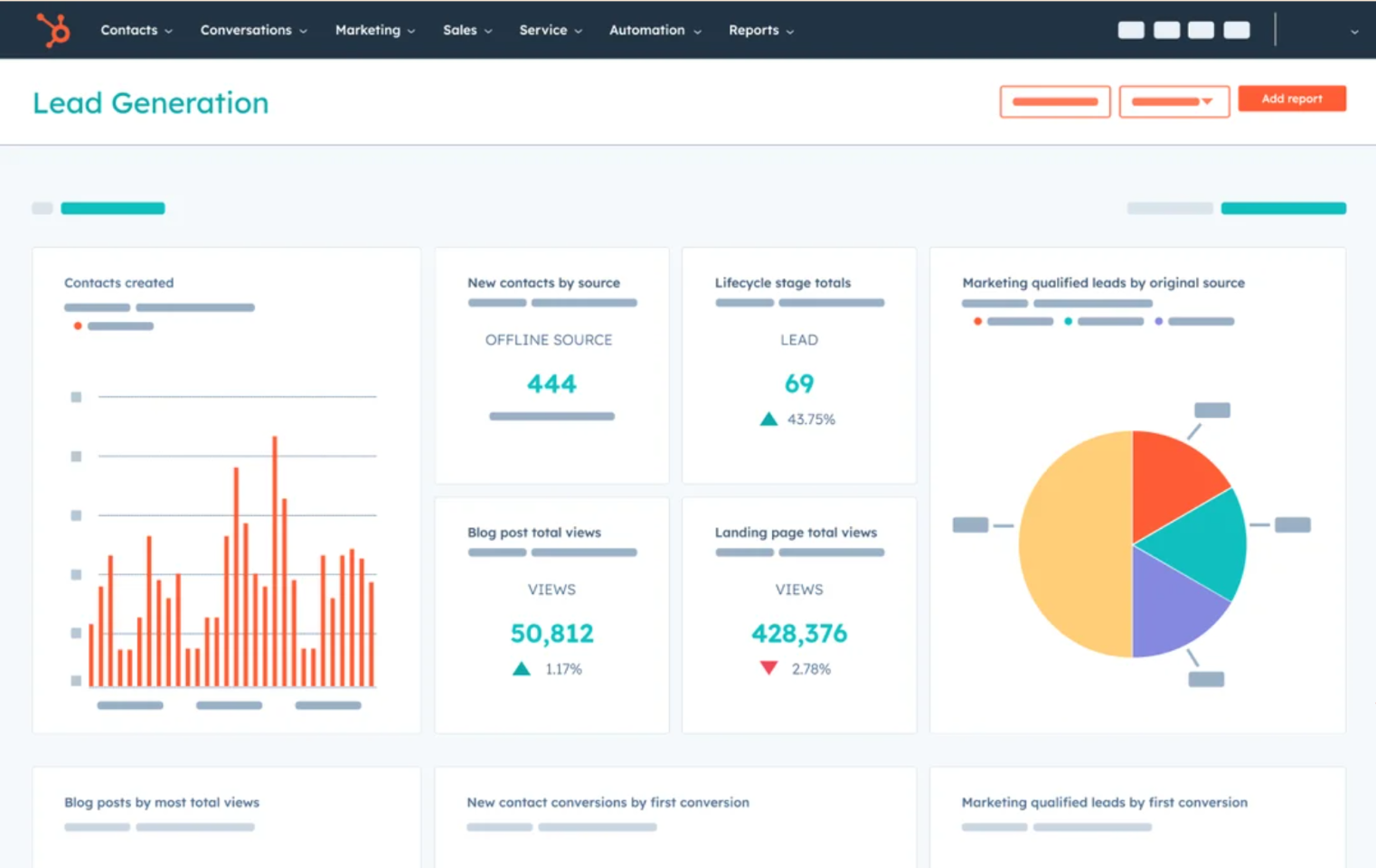
What surprised me over time was how far you could stretch the free tools before hitting a wall. Between the CRM, basic email tools, and simple reporting, a lean team could run months of operations without paying anything, though the moment you needed automation or advanced reporting, the upgrade prompts arrived quickly.
The ecosystem is genuinely HubSpot’s strongest card. Sales, marketing, service, and content tools all live under one roof, so switching between a blog post and a support ticket felt seamless in a way most standalone CRMs can’t replicate. If the pricing eventually feels steep for what your team uses, it’s worth comparing a few HubSpot alternatives before renewing.
Pros:
- Unified sales, marketing, and service hubs in one ecosystem
- Two way data sync with hundreds of third party apps
- Strong educational content and onboarding resources
- Intuitive interface despite the depth of available tools
Cons:
- Enterprise level pricing climbs steeply as teams scale
- Can feel like overkill for teams that only need contact tracking
User Rating (G2): 4.4/5
Pricing:
Free plan available; paid plans from $20/user/month.
3. Salesforce Sales Cloud – Best For Enterprise Extensibility
I rolled out Salesforce for a mid sized sales team that had genuinely outgrown every lighter CRM they tried, and the sheer depth of customization was the reason it stuck. Nearly every field, workflow, and permission could be shaped to match how the business actually operated.
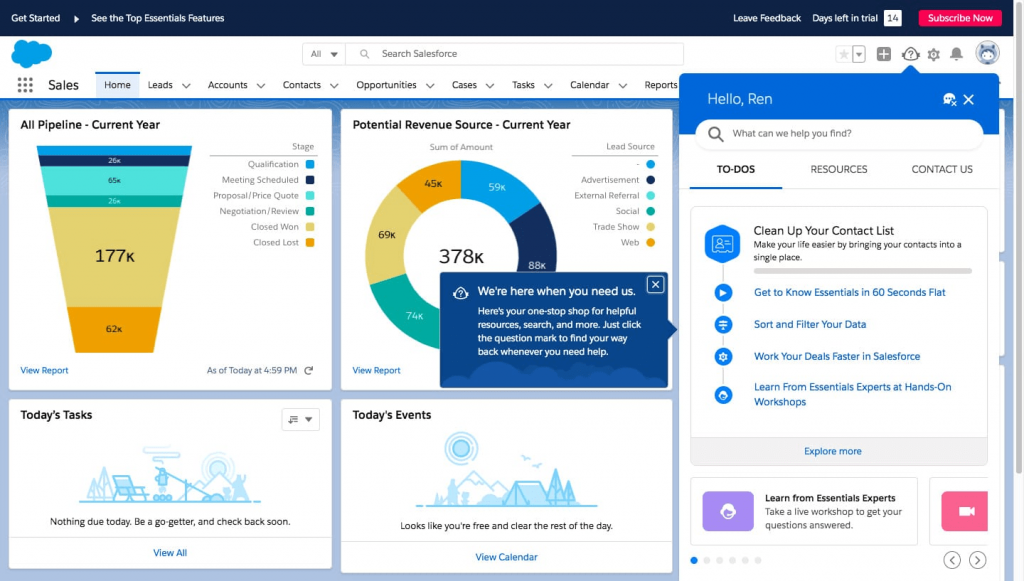
The learning curve, though, was real. Getting the platform configured properly took weeks of setup, and I leaned on a certified admin more than once to avoid breaking something mid rollout. This isn’t software you casually self serve on a Tuesday afternoon.
Where it earned its keep was in reporting and forecasting. Once configured, the dashboards gave leadership a level of pipeline visibility that smaller tools simply couldn’t match, especially across multiple regions and teams. Smaller businesses priced out of this tier often look at Salesforce CRM alternatives built specifically for leaner operations.
Pros:
- Deep customization of fields, workflows, and permissions
- Einstein AI features for forecasting and lead scoring
- Extensive app marketplace for add on functionality
- Strong multi team and multi region reporting
Cons:
- Steep learning curve requiring dedicated admin support
- Migrating out of the platform later is notoriously difficult
User Rating (G2): 4.4/5
Pricing:
Starts at $25/user/month.
4. Zoho CRM – Best For AI Powered Automation at Scale
I tested Zoho CRM for a client managing thousands of contacts across multiple business units, and Zia, its resident AI, became the feature I leaned on most. It flagged unusual drops in deal activity before I noticed them myself while scanning reports manually.
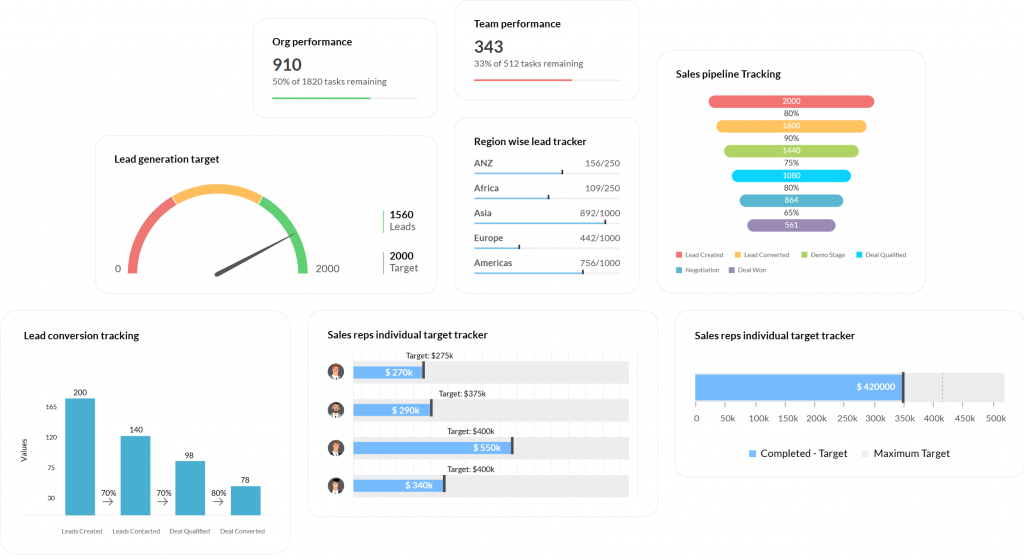
The interface took some getting used to. It’s not the most polished CRM I’ve worked in, and new team members needed a few sessions before navigating confidently. But once past that curve, the sheer feature depth, spanning marketing, help desk, and multichannel support, made it hard to outgrow.
What stood out most was how well it played with the rest of the Zoho suite. For a business already using Zoho’s other apps, the CRM felt like the natural, cost effective hub to tie everything together, though teams that outgrow it often explore Zoho CRM alternatives with a simpler interface.
Pros:
- Zia AI flags anomalies and predicts deal outcomes
- Deep integration across the wider Zoho software suite
- Multichannel marketing and help desk features included
- Affordable pricing relative to feature depth
Cons:
- Interface feels dated compared to newer competitors
- Some advanced AI features are gated to higher tiers
User Rating (G2): 4.1/5
Pricing: Free plan available; paid plans from $20/user/month.
5. Pipedrive – Best For Visual, Easy to Use Sales Pipeline
I handed Pipedrive to a sales rep who’d never used a CRM before, and she was building her own pipeline within the hour without a single training call. The visual deal cards and color coded activity flags made the entire system self explanatory.
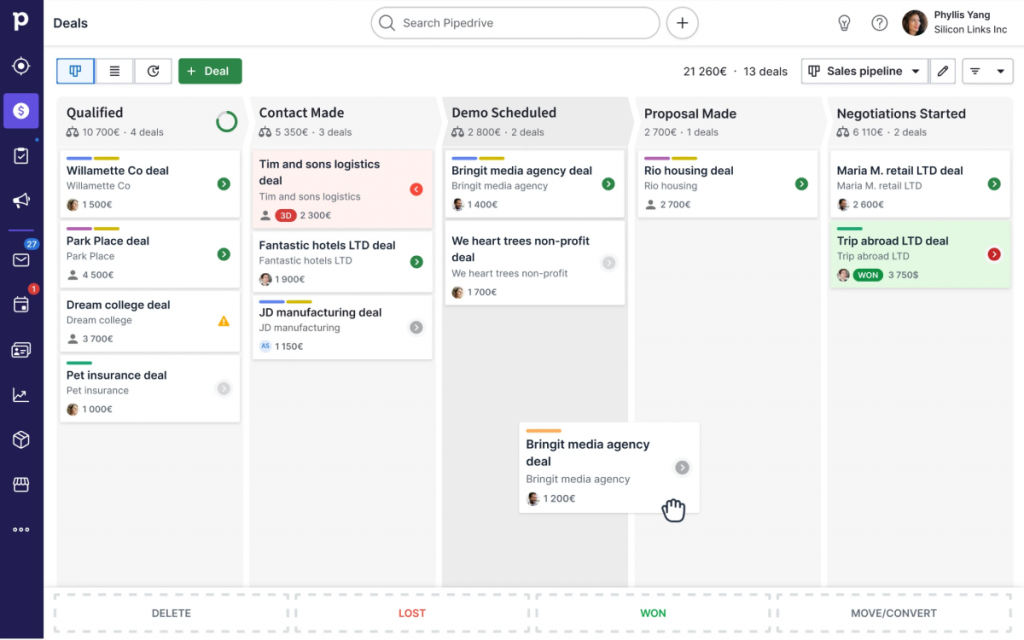
What I liked most in daily use was how the software nudged good habits without being naggy. It flagged overdue activities clearly and warned me before I accidentally added a duplicate contact from a trade show list, small touches that saved real time over a busy quarter.
The add on structure did add up in cost, though. Once I wanted email marketing and advanced automation on top of the base plan, the per user price crept higher than I expected going in, which is when a few teams start browsing Pipedrive alternatives with bundled pricing instead.
Pros:
- Clean, visual pipeline built specifically for salespeople
- Automatic duplicate contact detection
- Native calling with automatic call logging
- AI sales assistant highlights high potential deals
Cons:
- Add ons for marketing and automation are priced separately
- Reporting customization is more limited than enterprise CRMs
User Rating (G2): 4.2/5
Pricing:
Starts at $24/user/month.
6. Freshsales – Best For Built In Phone and Email
I ran Freshsales for a small outbound sales team, and the built in calling feature meant reps never had to tab out to a separate dialer app. Calls, emails, and contact history all lived on the same screen, which cut down on the constant app switching that usually slows a sales day down.
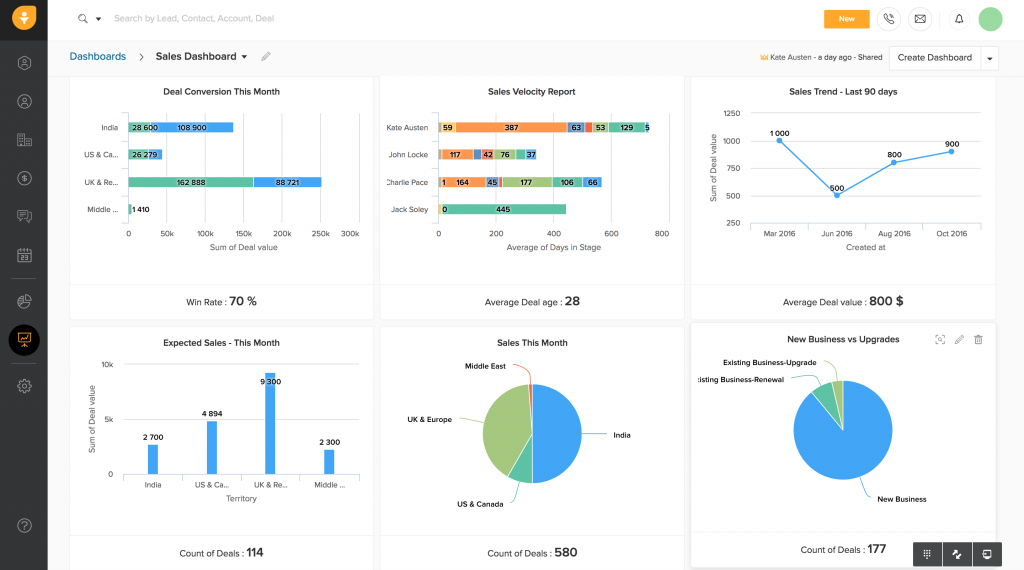
The AI lead scoring became genuinely useful once enough historical data built up. It started surfacing which contacts were most likely to convert, and I found myself trusting its priority order more than my own gut feeling by the second month.
Support was responsive whenever I hit a configuration question, though I did notice the reporting suite felt thinner than some competitors once I wanted more granular, custom dashboards.
Pros:
- Built in phone and email in a single workspace
- AI lead scoring improves with more historical data
- Clean, modern interface that’s easy to navigate
- Freddy AI assists with deal insights and next steps
Cons:
- Reporting customization is thinner than top tier competitors
- Mobile app occasionally lags behind desktop feature parity
User Rating (G2): 4.5/5
Pricing:
Starts at $15/user/month.
7. Zoho Bigin – Best For Ultra Simple Small Team CRM
I set up Bigin for a two person consulting shop that had explicitly told me they didn’t want “another Salesforce.” Within a single afternoon, they had their pipeline, contacts, and a few basic automations running without ever opening a manual.
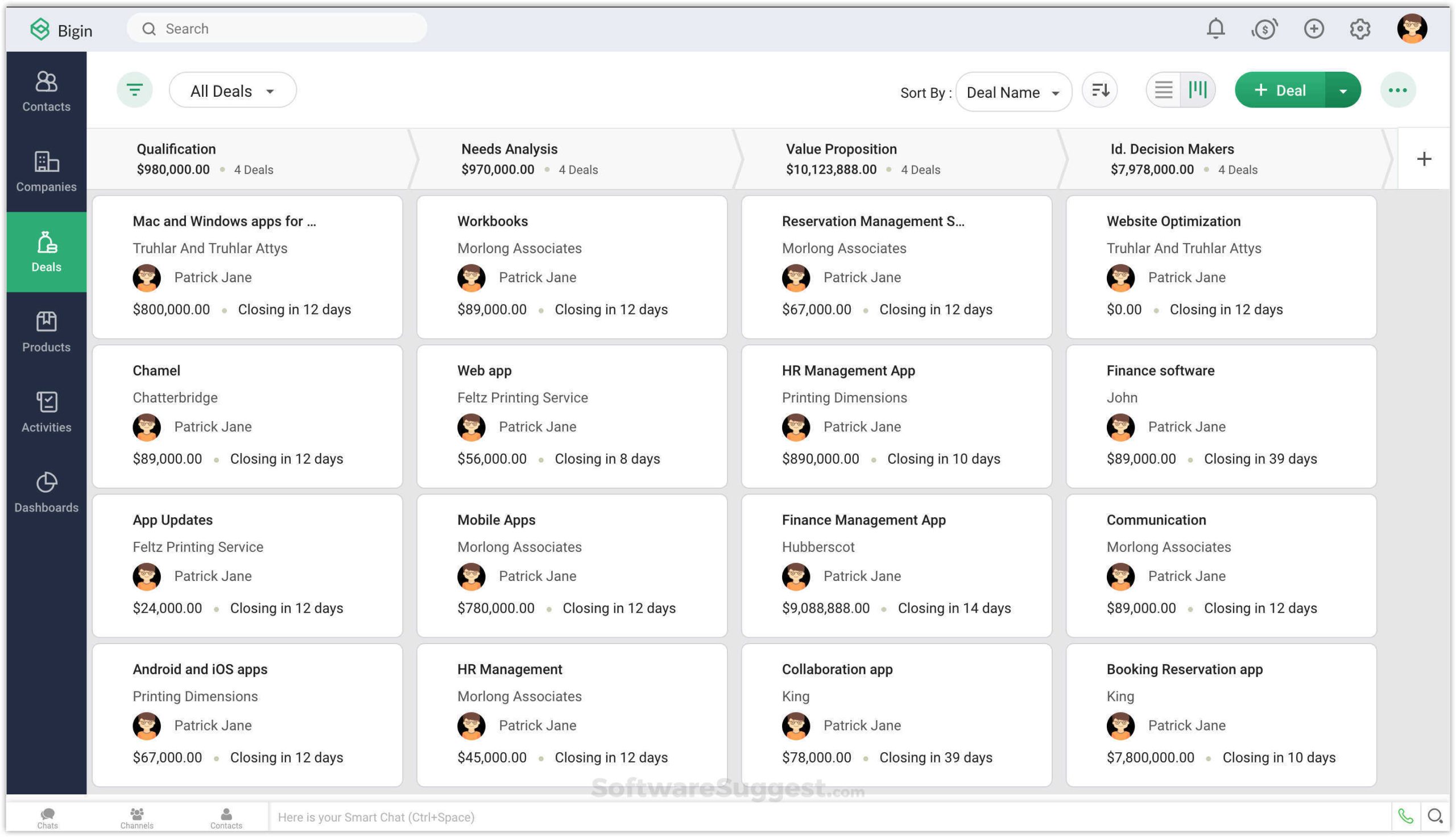
The trade off was obvious almost immediately: this isn’t a deep platform. It’s intentionally stripped down to the essentials, so once that consulting shop grew past a handful of reps, some of the automation and reporting needs started outpacing what Bigin could offer.
For exactly what it’s built for, though, a lean team that just needs contacts, a pipeline, and basic reminders, it did the job without a single wasted click or unnecessary menu.
Pros:
- Affordable entry price for very small teams
- Clean, uncluttered pipeline view
- Built in telephony and email in lower tiers
- Backed by the wider Zoho ecosystem if you scale up later
Cons:
- Limited automation depth compared to full Zoho CRM
- Reporting is basic relative to enterprise competitors
User Rating (G2): 4.5/5
Pricing:
Starts at $7/user/month.
8. ActiveCampaign – Best For Email Marketing Automation Combined With CRM
I moved a one person recruitment agency off ActiveCampaign a while back, not because the product was weak, but because they were paying for marketing automation depth they never touched. Still, for a team that lives and dies by email sequences, it’s one of the strongest combinations of CRM and campaign automation available.
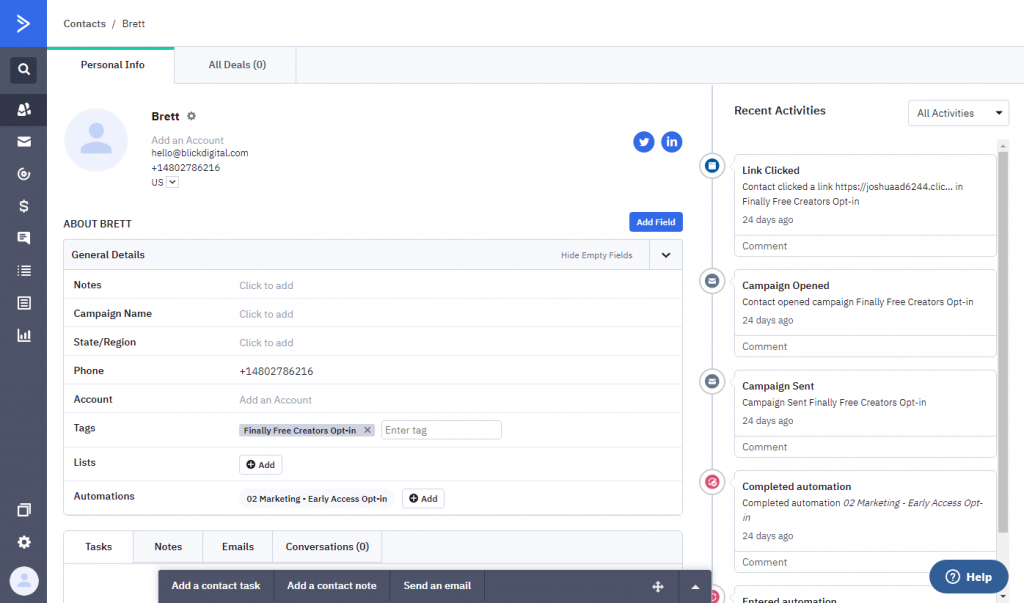
The visual automation builder let me map out entire lead nurture journeys, from a website form submission through a multi week email sequence, without writing a single line of code. Watching a lead move automatically through that journey in real time was genuinely satisfying to see work.
Where it stretched thin was on pure sales pipeline features. Compared to CRMs built sales first, ActiveCampaign’s deal tracking felt like a secondary feature bolted onto a marketing automation core, which is why some teams eventually check out ActiveCampaign alternatives with pipeline management as the primary focus.
Pros:
- Powerful visual automation builder for email sequences
- Strong deliverability and email marketing performance
- Predictive sending and content personalization features
- Native CRM and marketing automation in one subscription
Cons:
- Sales pipeline features are lighter than dedicated sales CRMs
- Pricing scales with contact volume, not just users
User Rating (G2): 4.5/5
Pricing:
Starts at $19/user/month.
9. Close – Best For Inside Sales and Cold Calling Teams
I put Close in front of a phone heavy sales team that made upward of 80 calls a day, and the Smart Views feature became their morning ritual instantly. It sorted leads into who needed a call, who’d opened an email, and who’d gone quiet for 30 days, all without a single manual filter.
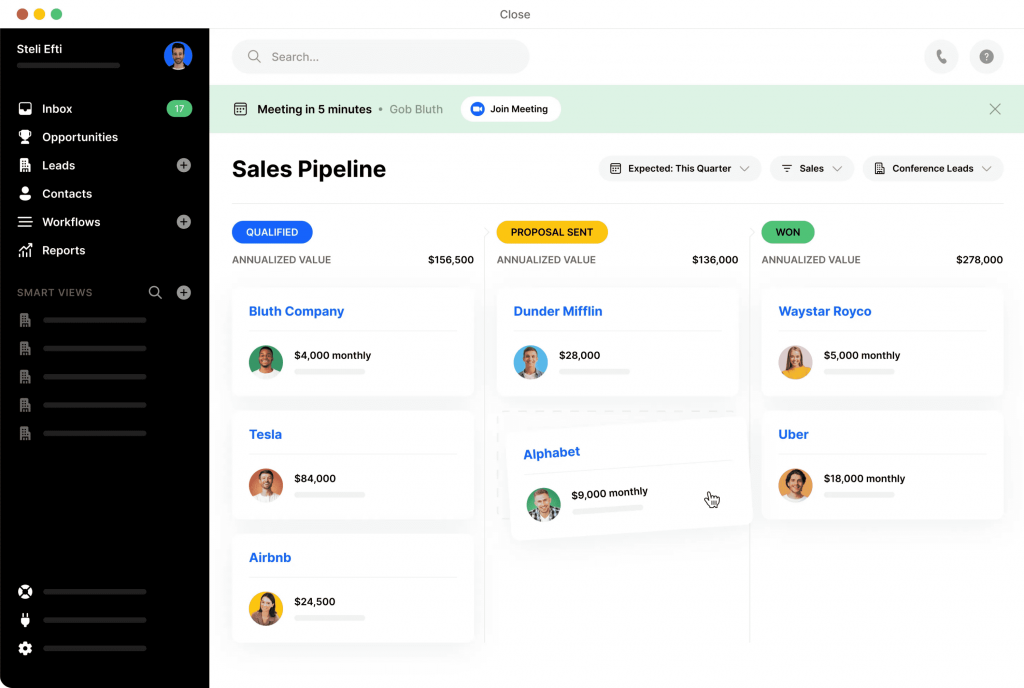
The built in Power Dialer was the standout for that team specifically. Reps could burn through a call list far faster than tabbing between a separate phone system and the CRM, and every call was logged and recorded automatically against the contact record.
Reporting customization was the one area that fell short. When leadership wanted a very specific forecast view, we had to work around the platform’s fixed report templates rather than building exactly what was requested.
Pros:
- Built in Power Dialer for high volume calling
- Smart Views prioritize which leads to contact next
- Automatic call recording and note logging
- Close GPT chatbot for interacting with CRM data
Cons:
- Reports aren’t highly customizable
- Fewer marketing automation features than all in one CRMs
User Rating (G2): 4.7/5
Pricing:
Starts at $19/user/month.
10. Keap – Best For Automation Heavy Funnels and Follow Ups
I built an entire client onboarding funnel inside Keap for a coaching business, and the Advanced Automation canvas was where the platform really proved itself. Triggers, conditions, and actions all lived on one visual map that I could adjust without touching a single line of code.
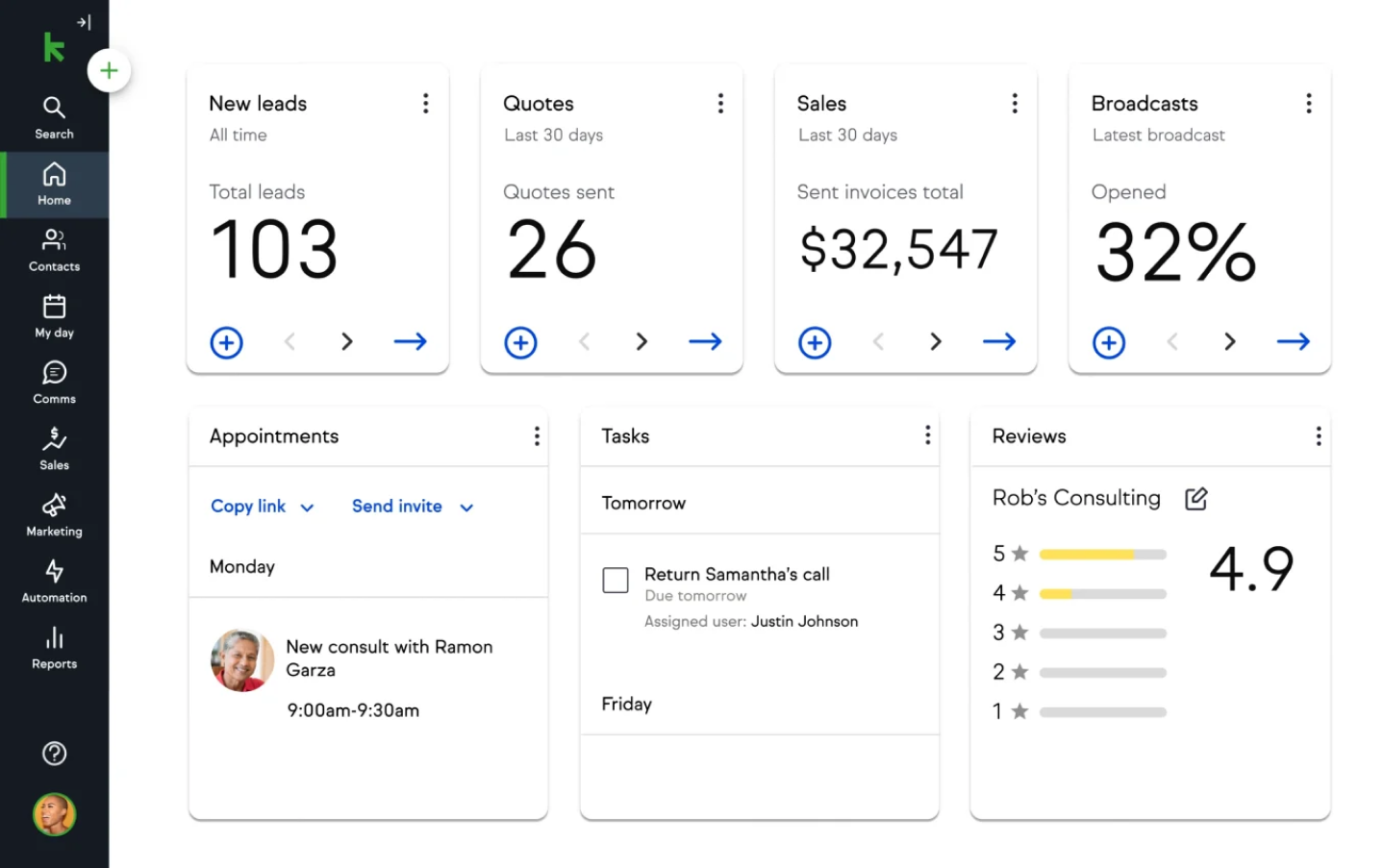
The AI Automation Assistant impressed me the first time I used it, generating a full funnel with email sequences based on a short prompt about the business and its audience. I still went back and tightened the copy manually, but it saved real hours compared to starting from a blank page.
The entry price was the hardest thing to justify for smaller teams. Compared to lighter CRMs on this list, Keap asks for a meaningfully bigger monthly commitment before you’ve even added a third user, which sends a lot of solo founders searching for Keap alternatives with a lower starting cost.
Pros:
- Advanced Automation canvas for complex funnel building
- AI Automation Assistant generates full campaigns from a prompt
- Built in landing pages and payment collection
- Detailed contact tagging and segmentation
Cons:
- High entry price compared to other small business CRMs
- Steeper learning curve for advanced automation features
User Rating (G2): 4.2/5
Pricing:
Starts at $299/month (2 users included).
11. Nutshell – Best For Managing and Coaching a Sales Team
I managed a ten person sales floor through Nutshell, and the territory based routing feature saved genuine hours each week. Leads within a set radius were assigned automatically, so reps stopped competing for the same accounts by accident.
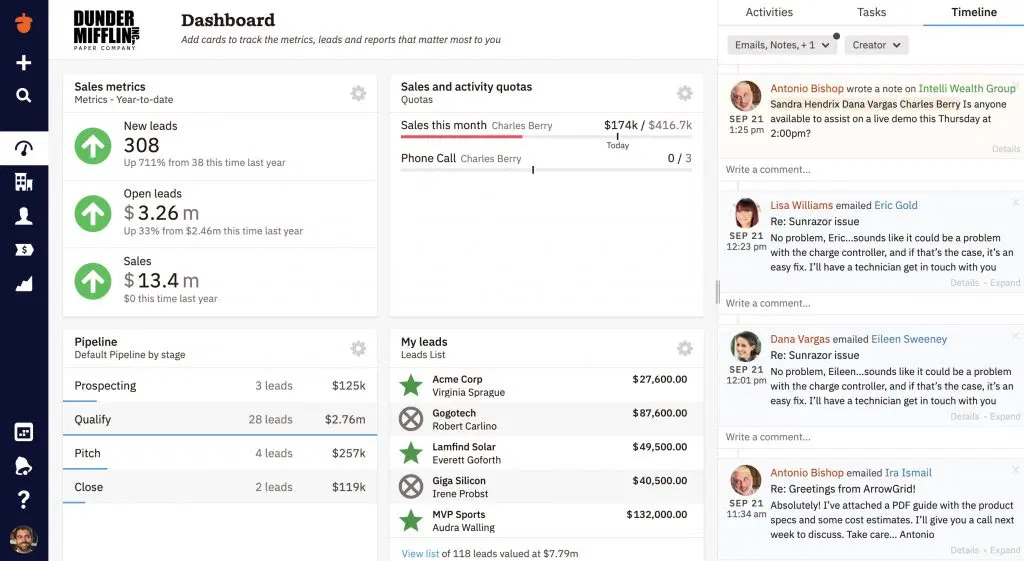
The reporting depth was where Nutshell earned its keep as a manager. Forecasts by territory, by rep, and by lead source gave me a clear read on where coaching was actually needed instead of guessing based on gut feeling.
The AI summarization features were a nice surprise. Zoom calls got transcribed and summarized automatically, turning what used to be a full call recording into a paragraph I could scan in seconds before a coaching session.
Pros:
- Territory based lead routing and assignment
- Detailed reporting by rep, territory, and source
- AI call transcription and timeline summarization
- Voice to text note taking during calls
Cons:
- Occasional minor interface glitches reported by users
- Fewer marketing automation features than dedicated tools
User Rating (G2): 4.3/5
Pricing:
Starts at $19/user/month.
12. Copper – Best For Teams Living Inside Google Workspace
I set up Copper for a team that ran their entire business through Gmail, Calendar, and Drive, and the integration felt less like a bolt on and more like Workspace simply grew a CRM. Existing email threads populated as contacts automatically the moment we connected the account.
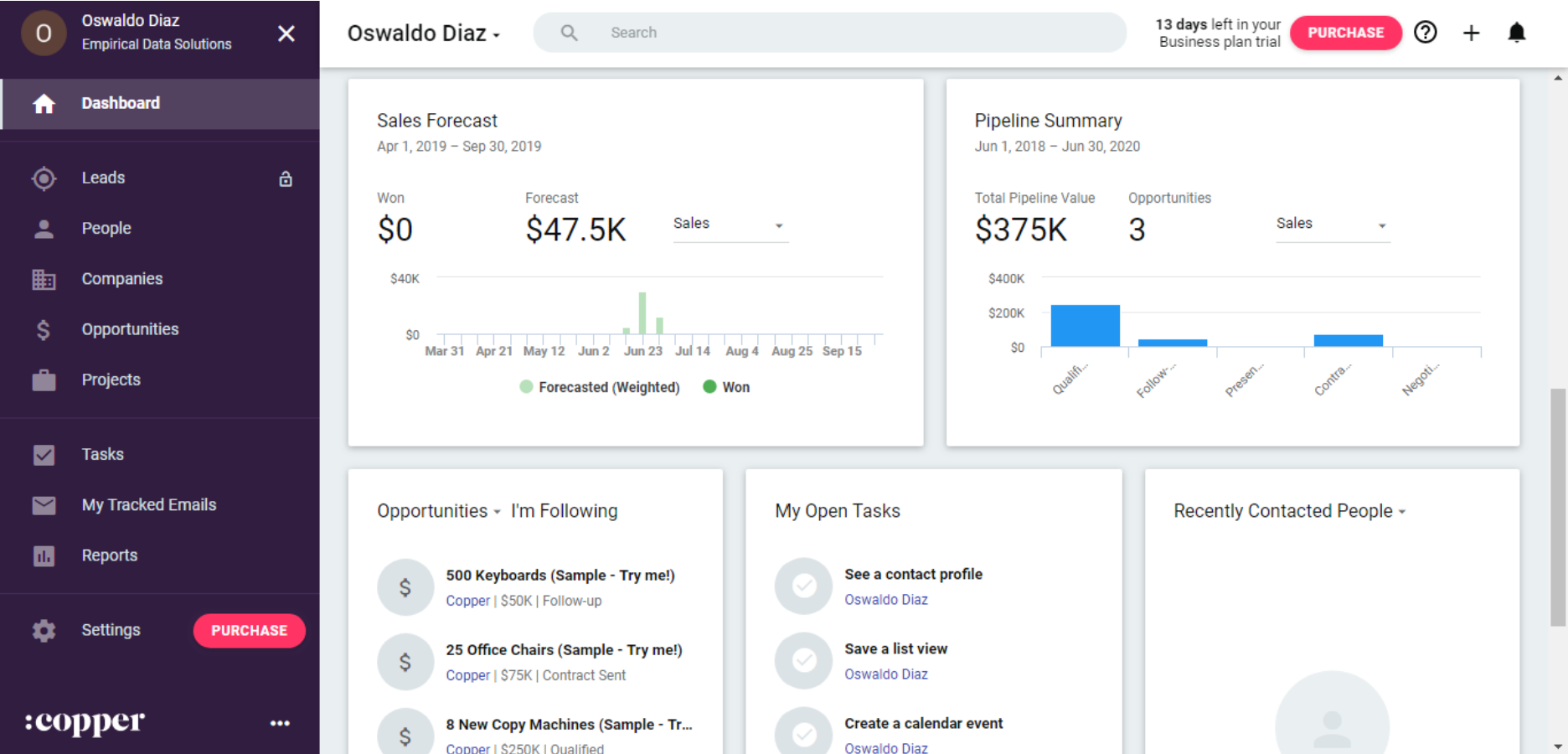
The Related tab became a daily habit almost immediately. Pulling up a lead’s email thread and instantly seeing linked Docs, Sheets, or Slides saved the constant tab switching that used to eat into actual selling time.
The one limitation that stood out clearly: if your team runs on Microsoft instead of Google, none of this integration magic applies, and Copper starts to feel like a much more ordinary CRM, which is when Microsoft-first teams tend to look at Copper CRM alternatives instead.
Pros:
- Deep native integration with Gmail, Drive, and Calendar
- Automatic contact creation from existing email threads
- Related tab surfaces linked documents instantly
- Lead scoring and predictive sales insights
Cons:
- No integration at all with the Microsoft ecosystem
- Fewer generative AI features than newer competitors
User Rating (G2): 4.4/5
Pricing:
Starts at $12/user/month.
Evaluation Criteria
I evaluated every product on this list using an unbiased, systematic approach that ensures a fair, insightful, and well rounded review. This method employs six key factors:
- User Reviews and Ratings: I weighed direct experiences from users, including ratings and feedback from reputable sites like G2 and Capterra, since ground level feedback reveals overall satisfaction and recurring problems better than any marketing page.
- Essential Features and Functionality: I looked at the core value of each product, its contact management, pipeline tracking, and automation depth, to judge practical usefulness rather than feature checklists alone.
- Ease of Use: I assessed how quickly a new user could become productive, focusing on interface design, navigation, and onboarding quality across all experience levels.
- Customer Support: I examined how efficiently each vendor supported users through setup, troubleshooting, and day to day operational questions.
- Value for Money: I compared quality, performance, and features against price, to judge whether a reader would genuinely get their money’s worth at each pricing tier.
- Personal Experience and Expert Opinions: I drew on my own hands on time inside each platform, combined with recurring themes from community discussions and industry commentary, to round out each evaluation beyond a spec sheet comparison.
If you’d rather work through this decision yourself, this breakdown of how to choose a CRM for your small business walks through the same six factors in more depth.
My Top 3 Picks for the Best CRM Software
If you only read one section of this list, make it this one. These are the three tools I’d point a small business toward first, based on the pain points I see repeat most often: scattered contacts, no mass email, and CRMs that cost more than the deals they help close.
1. BIGContacts
BIGContacts is my first recommendation for any small business, solopreneur, or lean sales team that’s currently managing contacts through Excel, Outlook, or a patchwork of tools. It combines contact management, email marketing, and task automation in one affordable subscription, and its AI features push it further ahead. The AI Marketing Campaign Designer builds full newsletters and promotional emails from a simple prompt, the AI Pipeline Tracker flags stalled deals before they go cold, and the AI powered dashboard scores leads and surfaces which contact types convert fastest.
2. HubSpot
HubSpot CRM is my second pick for teams that want to grow into a full marketing and sales ecosystem without paying anything at the start. The free plan’s unlimited contacts make it a strong first CRM for a bootstrapped business, and the eventual upgrade path into marketing, service, and content tools means you’re unlikely to outgrow the platform entirely, even if the pricing does climb as you scale.
3. Pipedrive
Pipedrive rounds out my top three for sales teams that want the simplest possible daily experience. Built by salespeople for salespeople, its visual pipeline and activity reminders make it nearly impossible to lose track of a deal, which is exactly the promise every CRM makes but few deliver as cleanly.
Find the Best CRM Software and Start Closing More Deals
The right CRM doesn’t just organize contacts, it changes how consistently your team follows up, and consistent follow up is the single biggest lever most small businesses have sitting unused. Every tool on this list can technically store a contact record, but the ones that actually earn a spot in your daily workflow are the ones that remove friction instead of adding another login to remember.
Take the pain point that brought you to this list, whether that’s scattered spreadsheets, missed follow ups, or a CRM that’s grown too expensive for what your team actually uses, and match it against the picks above rather than defaulting to whichever name is most familiar. The best CRM software for a 500 person enterprise is rarely the best fit for a five person team, and there’s no shame in choosing the simpler tool.
For teams looking for something simple to start with, a tool like BIGContacts makes it easy to set up contact management, email marketing, and AI powered follow ups without hours of training or a big software budget behind it. The benefits of CRM for small business go well beyond organization alone once the follow up habit actually sticks.
BIGContacts, Zoho Bigin, and HubSpot CRM are consistently the best fits for small business, offering affordable pricing, simple onboarding, and the core contact and email features small teams need without enterprise complexity. CRM pricing ranges from free plans with limited features to $300 or more per month for enterprise suites. Most small business CRMs, including BIGContacts, start between $7 and $25 per user per month. Yes. HubSpot CRM and Zoho CRM both offer free plans with unlimited or capped contacts, and BIGContacts offers a forever free plan for a single user to test the platform before upgrading. See this list of best free CRM software for a fuller comparison. Look for contact management, a visual sales pipeline, task reminders, email marketing, and reporting. AI features like lead scoring and automated follow ups are increasingly standard in 2026. Yes. A CRM adds shared access, duplicate detection, mass email, and automated reminders that spreadsheets and inboxes can’t provide once more than one person manages the same contact list. BIGContacts supports integrations with popular email and calendar tools, along with Zapier connections for extending functionality to other apps your team already uses. A CRM tracks the full relationship and sales pipeline for a contact, while email marketing software focuses only on campaigns. BIGContacts combines both, so you don’t need a separate Mailchimp subscription. Simple CRMs like BIGContacts or Zoho Bigin can be set up in a single afternoon, while enterprise platforms like Salesforce often require weeks of configuration and dedicated admin support. Both can be overkill for a five person team. Small businesses often get better value from purpose built small business CRMs like BIGContacts, which include the essentials without the enterprise price tag. BIGContacts and Zoho Bigin are strong fits for solopreneurs, offering simple pipelines, contact tracking, and email marketing without requiring a full sales team to manage. Most CRMs, including BIGContacts, support direct CSV or Excel import, mapping your existing columns to contact fields so historical CRM migration happens without manual re-entry. Zoho CRM’s Zia and BIGContacts’ AI suite, including the AI Marketing Campaign Designer and AI Pipeline Tracker, are among the most complete implementations of AI with CRM for small and mid sized teams heading into 2026.Frequently Asked Questions
What is the best CRM software for a small business?
How much does CRM software cost?
Is there a free CRM software option?
What features should the best CRM software include?
Can a CRM replace excel or outlook for contact management?
Does BIGContacts integrate with Outlook and Gmail?
What is the difference between a CRM and email marketing software?
How long does it take to set up a CRM?
Is Salesforce or Hubspot better for a small team?
What is the best CRM software for solopreneurs?
How do I migrate contacts from excel into a CRM?
Which CRM has the best AI features in 2026?